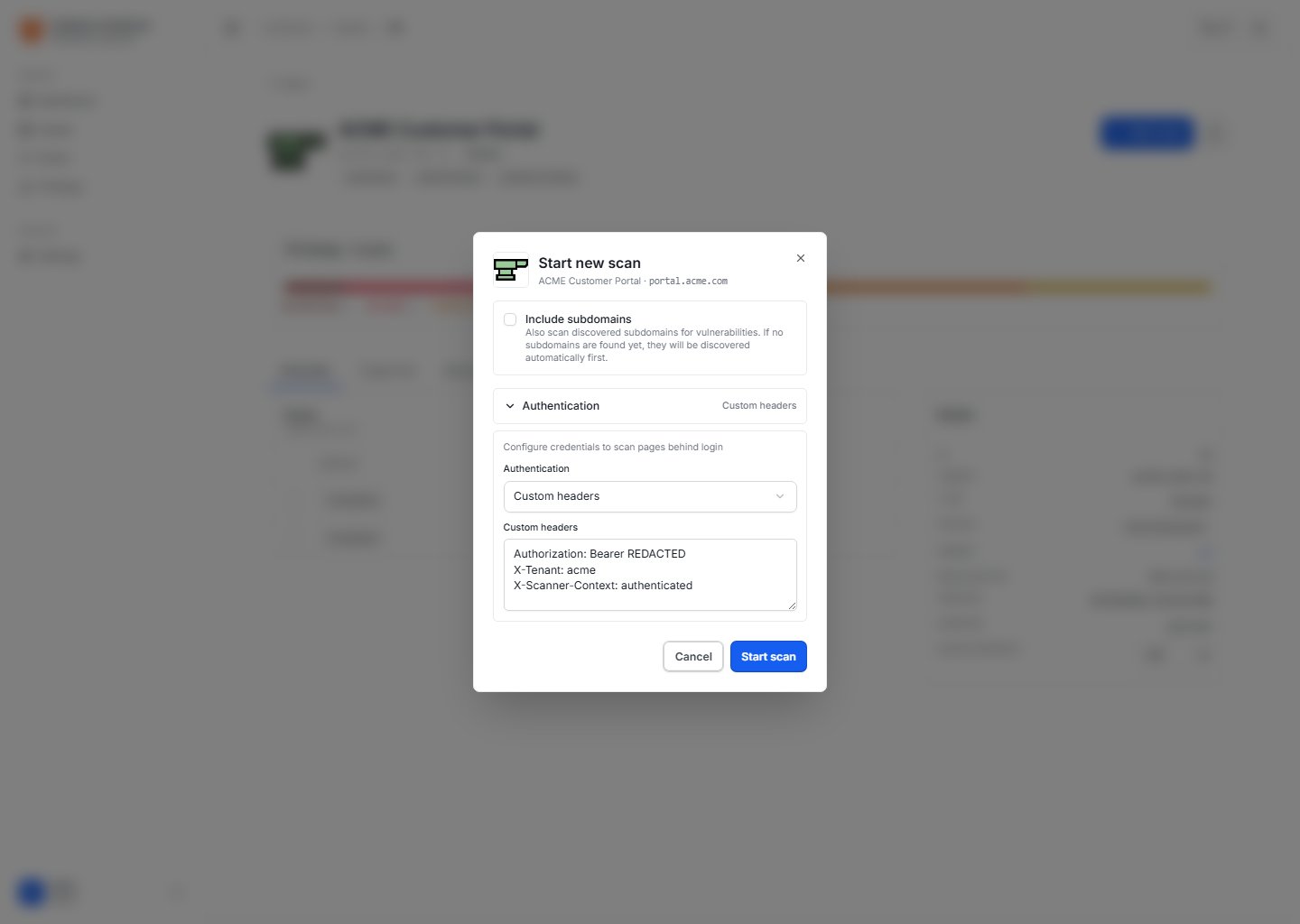
Many important vulnerabilities are only reachable after login: authorization issues, sensitive APIs, upload workflows, admin functions, payment flows, and employee-only portals. An unauthenticated scan can only assess the public surface, so it may miss risk inside authenticated areas. CyStack VulnScan supports authenticated scanning by sending user-provided access context such as session cookies, custom headers, API tokens, or HTTP Basic Authentication credentials. Authenticated scan configuration

When to Use Authenticated Scanning

Use authenticated scanning when:
  • Critical application functionality appears only after login.
  • APIs require bearer tokens, API keys, or tenant headers.
  • A staging site is protected with HTTP Basic Authentication.
  • You need to assess customer, employee, or admin areas with a dedicated test account.
  • Public-only scan results do not represent the real application risk.
Use a dedicated test account with the minimum required permissions. Avoid personal administrator accounts unless the assessment plan explicitly authorizes them.

Supported Authentication Context

MethodUse CaseExample
Session cookieBrowser-based web applications after login.session=...; tenant=acme
Custom headerAPIs, bearer tokens, API keys, tenant headers, staging gateways.Authorization: Bearer ...
HTTP Basic AuthenticationStaging or protected sites that require Basic Auth.scanner:password

Web UI Workflow

  1. Sign in to the target application with a test account.
  2. Copy the required cookie or token from browser developer tools.
  3. Open the asset detail page in VulnScan.
  4. Choose Start scan.
  5. Add the cookie, header, or Basic Auth credentials.
  6. Review scope and start the scan.
  7. After completion, open the scan detail page to review findings from authenticated areas.

CLI Examples

Cookie-based session:
vulnscan scan --target https://portal.acme.com --cookie "session=REDACTED; tenant=acme" --output ./reports --format json,csv
Bearer token or API key:
vulnscan scan --target https://api.acme.com -H "Authorization: Bearer REDACTED" -H "X-Tenant: acme" --output ./reports --format json,csv
HTTP Basic Authentication:
vulnscan scan --target https://staging.acme.com --basic-auth "scanner:REDACTED" --output ./reports --format json,csv

What Authenticated Scans Improve

Authenticated scans improve coverage for:
  • Authorization and role-based access issues.
  • API vulnerabilities behind tokens.
  • File upload, form handling, and business workflows after login.
  • SQL injection, XSS, SSRF, CSRF, and misconfiguration in private areas.
  • Admin pages, debug endpoints, libraries, and plugins not exposed publicly.

Safe Practices

  • Use approved environments and test accounts.
  • Grant only the permissions required for the assessment.
  • Avoid real user accounts.
  • Avoid write/delete tokens unless the scan requires them and the test is approved.
  • Use test data where possible.
  • Rotate or revoke sensitive tokens after the assessment.

Troubleshooting

ProblemWhat to Check
The scan cannot see logged-in pagesCookie or token may be expired, scoped to the wrong domain, or missing required headers.
The application returns 401/403Check account permissions, tenant context, IP allowlist, and automation controls.
The scan is slowReduce scope, use a smaller test account, or scan outside peak hours.
Expected findings are missingCheck whether the application requires multi-step login, dynamic CSRF tokens, or additional headers.