> ## Documentation Index
> Fetch the complete documentation index at: https://docs.cystack.net/llms.txt
> Use this file to discover all available pages before exploring further.

# Yêu cầu Khởi động lại/Tắt thiết bị từ xa

> Hướng dẫn sử dụng tính năng Yêu cầu khởi động lại hoặc tắt thiết bị từ xa

<Card>
  **Trường hợp sử dụng:**

  * Bảo trì hệ thống ngoài giờ: Tự động khởi động lại máy sau khi cập nhật Windows hoặc cài đặt bản vá bảo mật vào bất kỳ thời gian nào
  * Ứng phó sự cố bảo mật: Khi phát hiện máy bị nhiễm malware hoặc ransomware, bộ phận IT có thể tắt hoặc ngắt kết nối máy ngay lập tức để tránh lây lan
</Card>

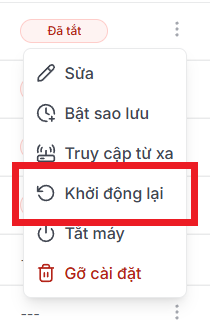
## Khởi động lại thiết bị từ xa

<Steps>
  <Step title={<>Ở màn "Thiết bị", bấm vào nút <code>{'\u22EE'}</code> cạnh thiết bị muốn khởi động lại {'\u2192'} chọn <code>Khởi động lại</code>.</>}>
    <img src="https://mintcdn.com/cystack/6GIjKD5B4ff4q6DA/images/endpoint/device-control-device-menu-restart.png?fit=max&auto=format&n=6GIjKD5B4ff4q6DA&q=85&s=46aa014acbe0abd77cbfe8118be652f2" alt="device-control-device-menu-restart" style={{display: 'block', margin: '0 auto'}} width="210" height="327" data-path="images/endpoint/device-control-device-menu-restart.png" />
  </Step>

  <Step title="Thiết bị sẽ được khởi động lại theo yêu cầu." />
</Steps>

***

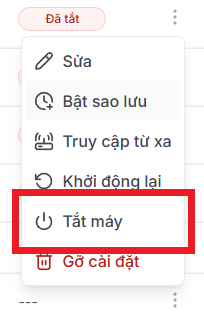
## Tắt thiết bị từ xa

<Steps>
  <Step title={<>Ở màn "Thiết bị", bấm vào nút <code>{'\u22EE'}</code> cạnh thiết bị muốn khởi động lại {'\u2192'} chọn <code>Tắt máy</code>.</>}>
    <img src="https://mintcdn.com/cystack/6GIjKD5B4ff4q6DA/images/endpoint/device-control-device-menu-shutdown.png?fit=max&auto=format&n=6GIjKD5B4ff4q6DA&q=85&s=e7f39784fe16f0b67c4855f3f1c73cba" alt="device-control-device-menu-shutdown" style={{display: 'block', margin: '0 auto'}} width="204" height="316" data-path="images/endpoint/device-control-device-menu-shutdown.png" />
  </Step>

  <Step title="Thiết bị sẽ được tắt theo yêu cầu." />
</Steps>