> ## Documentation Index
> Fetch the complete documentation index at: https://docs.cystack.net/llms.txt
> Use this file to discover all available pages before exploring further.
# WAF overview
> Introduction to CyStack WAF: purpose, edge-layer architecture, traffic flow, and key concepts
**CyStack WAF** is a Web Application Firewall that operates at the **edge layer** and is built directly into CyStack VulnScan. The WAF sits in front of your organization's sites, inspects every HTTP/HTTPS request before it reaches the origin server, and blocks common web attacks such as SQL injection, XSS, path traversal, vulnerability scanning, login abuse, and access to sensitive files.
Unlike simply **detecting** vulnerabilities, the WAF lets your organization **actively prevent** exploitation: a vulnerability that VulnScan has just discovered can be temporarily patched (virtual patch) right at the edge while your development team fixes it properly in the source code.
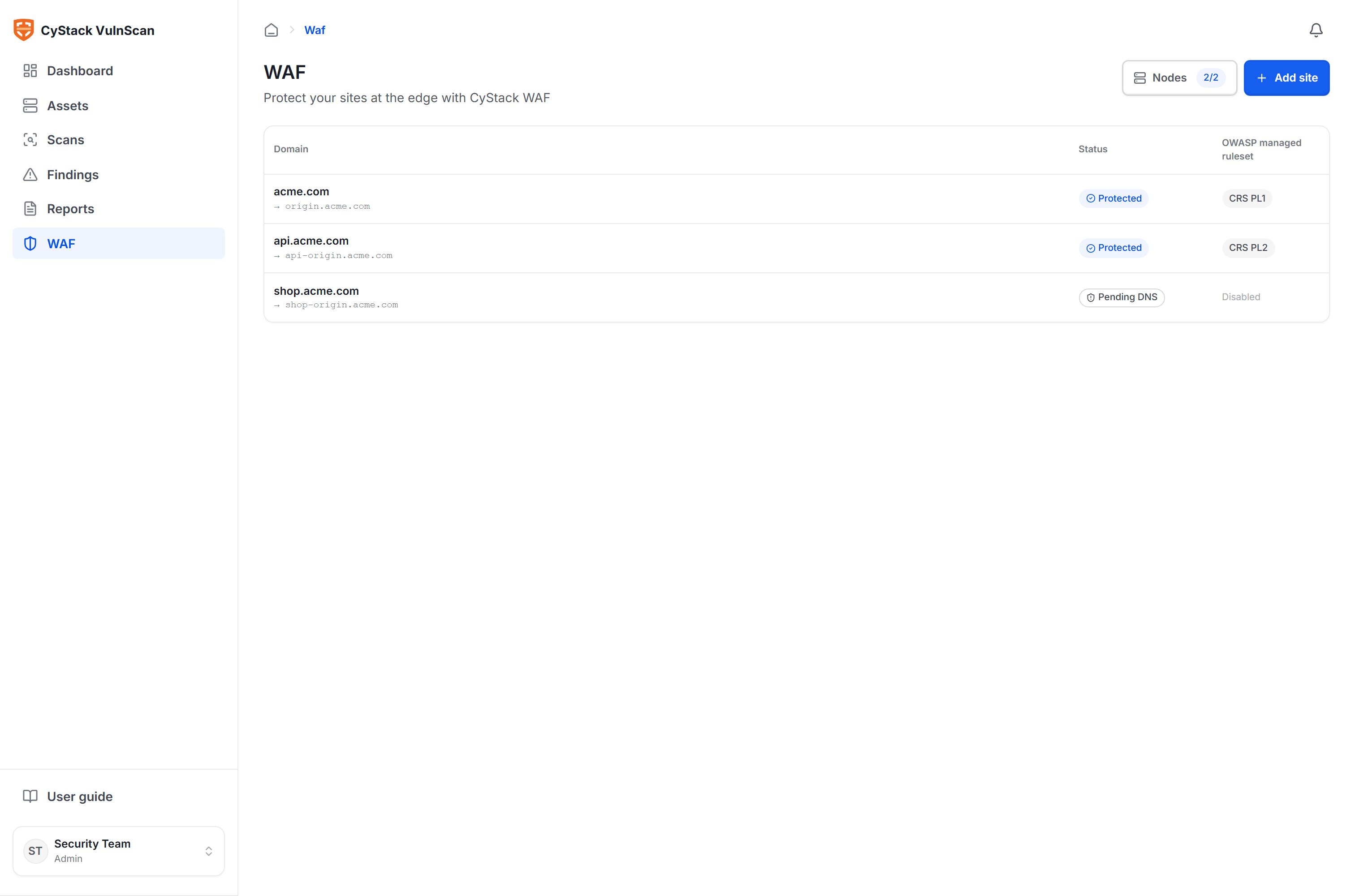 ## Why you need a WAF at the edge
A vulnerability scan tells you what risks your organization **currently** has, but it does not stop an attacker from exploiting them during the time it takes to patch. This window often lasts days to weeks. An edge WAF narrows that gap:
* **Blocks attacks before they reach the application** using a managed OWASP ruleset, with no source code changes required.
* **Virtually patches vulnerabilities** right after a scan, turning findings into protection within minutes.
* **Reduces automated attack load** such as brute-force, scanning, and bots through rate limiting and access control by IP, country, or ASN.
* **Provides traffic visibility** with security events, suspicious sources, and real-time analytics.
* **Deploys flexibly** on your organization's own infrastructure (self-operated edge nodes), keeping full control over your data and the path your traffic takes.
## Architecture and traffic flow
CyStack WAF works as a **reverse proxy**: your organization points its domain names to the **edge nodes** that you operate. Each request passes through a node, is inspected by the WAF engine, and is only forwarded to the origin if it is valid.
```mermaid theme={null}
flowchart TD
Client["User / Attacker"]
Node["Edge node — CyStack WAF
## Why you need a WAF at the edge
A vulnerability scan tells you what risks your organization **currently** has, but it does not stop an attacker from exploiting them during the time it takes to patch. This window often lasts days to weeks. An edge WAF narrows that gap:
* **Blocks attacks before they reach the application** using a managed OWASP ruleset, with no source code changes required.
* **Virtually patches vulnerabilities** right after a scan, turning findings into protection within minutes.
* **Reduces automated attack load** such as brute-force, scanning, and bots through rate limiting and access control by IP, country, or ASN.
* **Provides traffic visibility** with security events, suspicious sources, and real-time analytics.
* **Deploys flexibly** on your organization's own infrastructure (self-operated edge nodes), keeping full control over your data and the path your traffic takes.
## Architecture and traffic flow
CyStack WAF works as a **reverse proxy**: your organization points its domain names to the **edge nodes** that you operate. Each request passes through a node, is inspected by the WAF engine, and is only forwarded to the origin if it is valid.
```mermaid theme={null}
flowchart TD
Client["User / Attacker"]
Node["Edge node — CyStack WAF
WAF engine: OWASP CRS + custom rules
Terminates TLS, filters requests, logs events"]
Origin["Origin server
Your organization's web application"]
Console["VulnScan console"]
Client -->|HTTPS| Node
Node -->|Forwards valid requests, encrypted| Origin
Console <-->|Pushes rule config, receives status and event logs| Node
```
The VulnScan console acts as the central management layer: the place where administrators declare sites, configure rules, and monitor events. Configuration is synchronized to every edge node over an encrypted channel; nodes report back their health status and traffic logs.
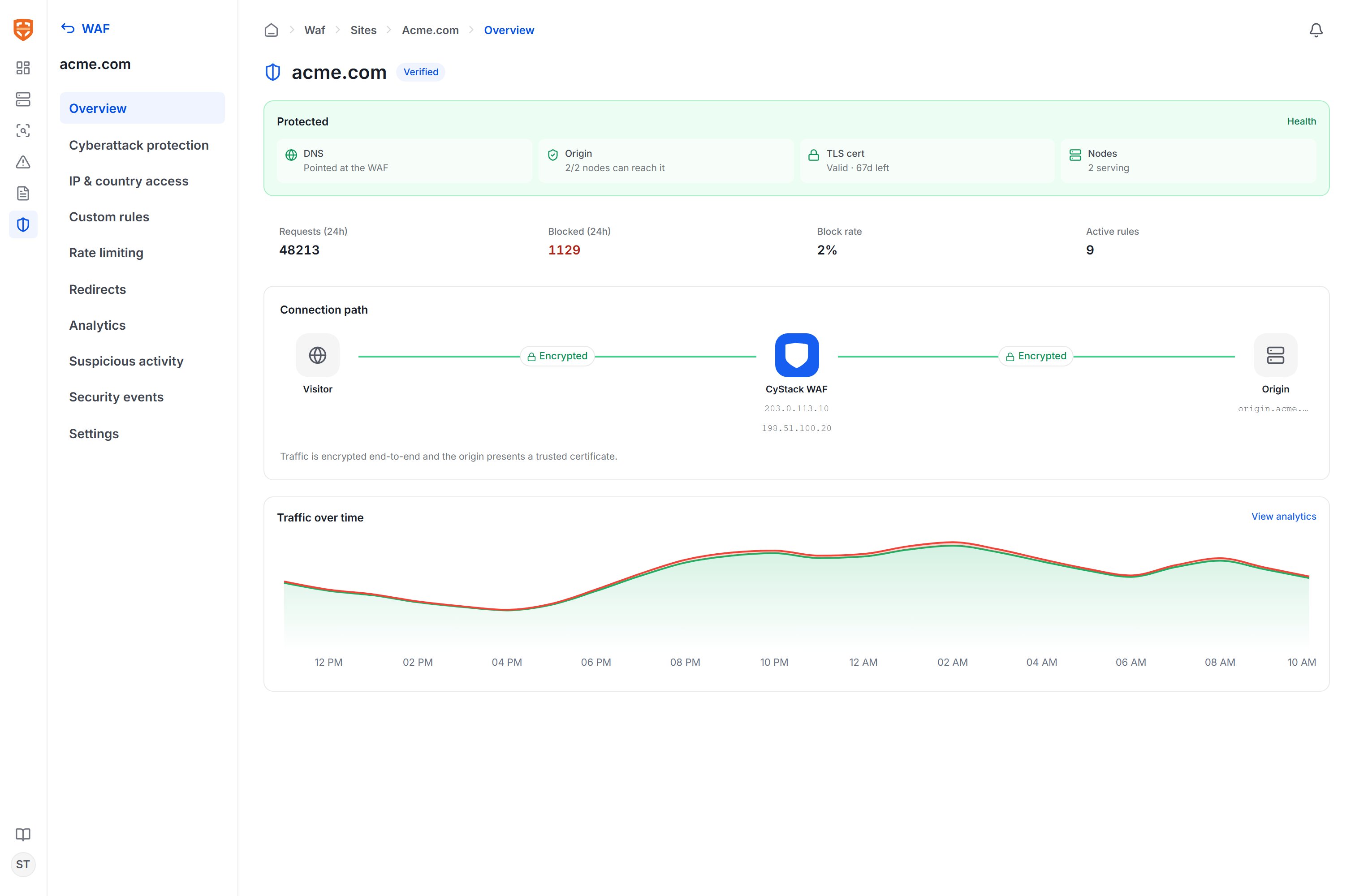 Traffic between the client and the edge node is encrypted with a TLS certificate, and traffic between the edge node and the origin is also encrypted if the origin supports HTTPS. The entire management connection between the console and nodes is end-to-end encrypted.
## Key concepts
| Concept | Description |
| -------------------- | ----------------------------------------------------------------------------------------------------------------------------------------------------------------------------------------------------- |
| **Edge node (Node)** | The `cywall` process that your organization installs on its own server. The node receives real traffic, runs the WAF engine, and serves all declared sites. See [Edge nodes](/en/vulnscan/waf-nodes). |
| **Site** | A domain protected by the WAF, tied to one or more origins. Each site has its own verification status, ruleset, and event history. See [Add & verify sites](/en/vulnscan/waf-sites). |
| **Origin** | The origin server hosting the real application, where the node forwards valid requests. |
| **Rule** | A security policy: the managed OWASP ruleset, custom rules, rate limiting, access control, and redirects. See [Protection rules](/en/vulnscan/waf-rules). |
| **Event** | A record of a request that was blocked or processed, including the IP, path, matched rule, and status code. See [Monitoring & analytics](/en/vulnscan/waf-monitoring). |
| **Virtual patch** | A custom rule generated by AI from a discovered vulnerability, blocking the exact attack signature without changing the source code. |
## How the WAF works with scan results
The WAF and the VulnScan vulnerability scanner complement each other within the same workspace:
1. VulnScan **scans** assets and discovers web vulnerabilities.
2. The AI layer **proposes virtual patch rules** for vulnerabilities that can be mitigated at the HTTP layer.
3. An administrator **reviews and applies** the rules to the corresponding site.
4. The edge node **blocks** exploit requests that match the vulnerability signature.
5. The **monitoring** page shows how much real attack traffic the rule is blocking.
## General deployment workflow
To start using the WAF, your organization performs four main steps:
1. **Install edge nodes** on one or more of your organization's servers and let them connect back to the console. See [Edge nodes](/en/vulnscan/waf-nodes).
2. **Add the sites** you want to protect, declare their origins, point DNS to the edge nodes, then verify. See [Add & verify sites](/en/vulnscan/waf-sites).
3. **Enable protection rules**: activate the managed OWASP ruleset and add custom rules or virtual patches. See [Protection rules](/en/vulnscan/waf-rules).
4. **Monitor and tune** through events, suspicious sources, and traffic analytics. See [Monitoring & analytics](/en/vulnscan/waf-monitoring).
The WAF feature requires a license with WAF usage rights. If the WAF section is not visible or is locked, contact the CyStack sales team at [sales@cystack.net](mailto:sales@cystack.net).
Traffic between the client and the edge node is encrypted with a TLS certificate, and traffic between the edge node and the origin is also encrypted if the origin supports HTTPS. The entire management connection between the console and nodes is end-to-end encrypted.
## Key concepts
| Concept | Description |
| -------------------- | ----------------------------------------------------------------------------------------------------------------------------------------------------------------------------------------------------- |
| **Edge node (Node)** | The `cywall` process that your organization installs on its own server. The node receives real traffic, runs the WAF engine, and serves all declared sites. See [Edge nodes](/en/vulnscan/waf-nodes). |
| **Site** | A domain protected by the WAF, tied to one or more origins. Each site has its own verification status, ruleset, and event history. See [Add & verify sites](/en/vulnscan/waf-sites). |
| **Origin** | The origin server hosting the real application, where the node forwards valid requests. |
| **Rule** | A security policy: the managed OWASP ruleset, custom rules, rate limiting, access control, and redirects. See [Protection rules](/en/vulnscan/waf-rules). |
| **Event** | A record of a request that was blocked or processed, including the IP, path, matched rule, and status code. See [Monitoring & analytics](/en/vulnscan/waf-monitoring). |
| **Virtual patch** | A custom rule generated by AI from a discovered vulnerability, blocking the exact attack signature without changing the source code. |
## How the WAF works with scan results
The WAF and the VulnScan vulnerability scanner complement each other within the same workspace:
1. VulnScan **scans** assets and discovers web vulnerabilities.
2. The AI layer **proposes virtual patch rules** for vulnerabilities that can be mitigated at the HTTP layer.
3. An administrator **reviews and applies** the rules to the corresponding site.
4. The edge node **blocks** exploit requests that match the vulnerability signature.
5. The **monitoring** page shows how much real attack traffic the rule is blocking.
## General deployment workflow
To start using the WAF, your organization performs four main steps:
1. **Install edge nodes** on one or more of your organization's servers and let them connect back to the console. See [Edge nodes](/en/vulnscan/waf-nodes).
2. **Add the sites** you want to protect, declare their origins, point DNS to the edge nodes, then verify. See [Add & verify sites](/en/vulnscan/waf-sites).
3. **Enable protection rules**: activate the managed OWASP ruleset and add custom rules or virtual patches. See [Protection rules](/en/vulnscan/waf-rules).
4. **Monitor and tune** through events, suspicious sources, and traffic analytics. See [Monitoring & analytics](/en/vulnscan/waf-monitoring).
The WAF feature requires a license with WAF usage rights. If the WAF section is not visible or is locked, contact the CyStack sales team at [sales@cystack.net](mailto:sales@cystack.net).