> ## Documentation Index
> Fetch the complete documentation index at: https://docs.cystack.net/llms.txt
> Use this file to discover all available pages before exploring further.
# Scans
> Configure, run, monitor, and interpret CyStack VulnScan scans
A scan turns asset context into verified security findings. CyStack VulnScan combines discovery, service fingerprinting, active checks, known-CVE matching, enrichment, deduplication, and risk scoring in one workflow.
For planning scope, authentication, scheduling, and output format before a scan starts, see [Scan Configuration](/en/vulnscan/scan-configuration).
## Before Starting a Scan
Confirm these items before scanning production systems:
* The target is inside the active license scope.
* The asset detail page shows the expected host, service, WAF/CDN, TLS, and technology context.
* The scan window is approved by the asset owner.
* Authenticated context is prepared if the application requires login.
* Mail delivery is configured if the team expects scan-completed notifications.
* The target can safely receive automated security testing traffic.
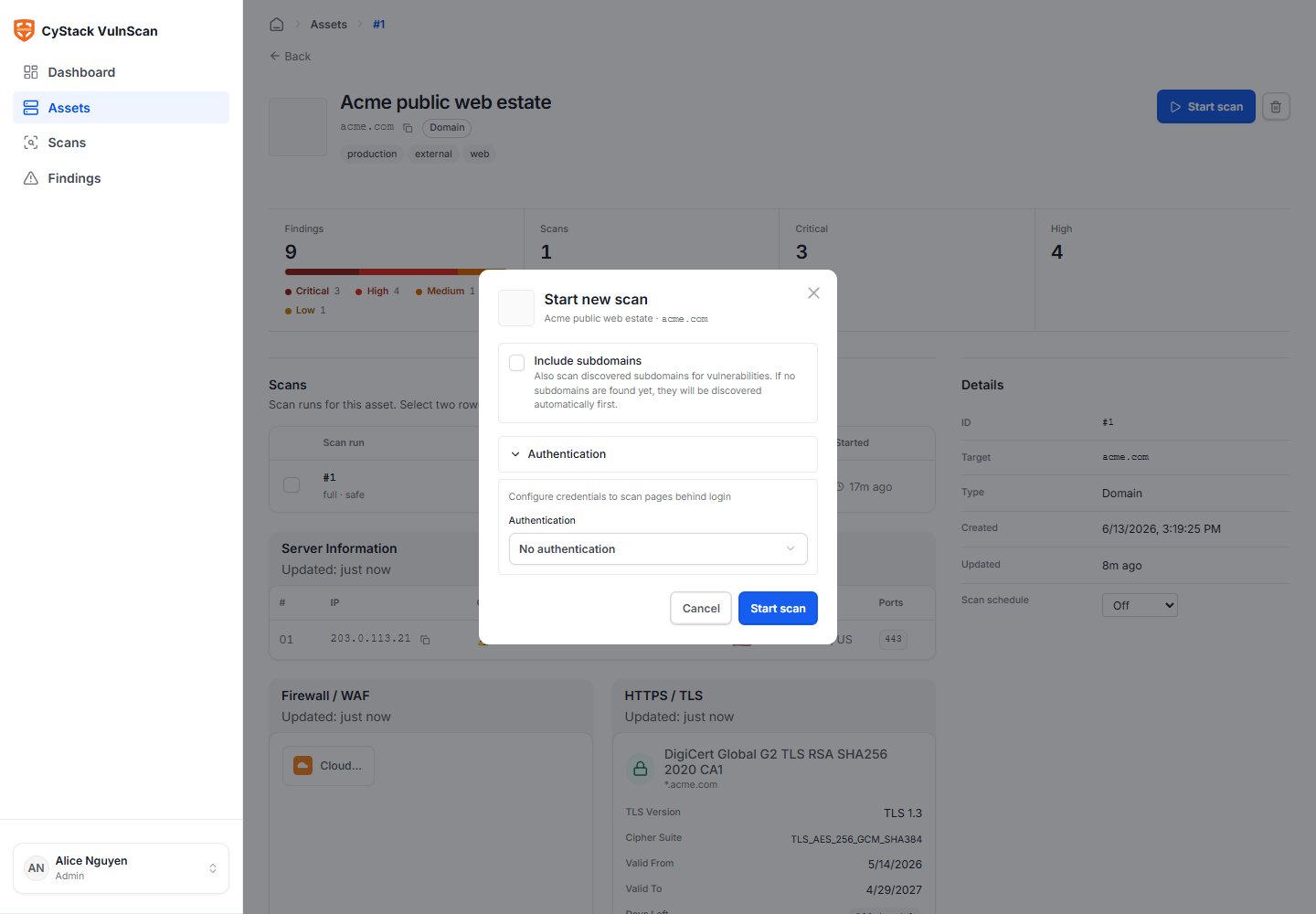
## Start a Scan in the Web UI
1. Open **Assets**.
2. Select the asset to assess.
3. Review discovery on the asset detail page.
4. Choose **Start scan**.
5. Review target scope and scan options.
6. Add authentication context if needed.
7. Submit the scan.
 ## Authentication Context
Authenticated scanning improves coverage for applications where important functionality is not visible to anonymous users.
Supported request context includes:
| Context | Use Case |
| ------------- | ---------------------------------------------------------------------------------------------- |
| Cookie | Scan a web application with a prepared logged-in session. |
| Custom header | Pass API keys, bearer tokens, tenant IDs, staging access headers, or internal routing headers. |
| Basic Auth | Access sites protected by HTTP Basic Authentication. |
Use test accounts with the least privilege needed for the assessment. Rotate or revoke tokens after a sensitive test when required by internal policy.
## Scan Lifecycle
| Status | Meaning |
| --------- | ---------------------------------------------------------------------------------- |
| Queued | The scan request has passed validation and is waiting for a worker. |
| Running | Discovery, fingerprinting, detection, enrichment, and persistence are in progress. |
| Completed | The scan finished and findings are available for triage and export. |
| Failed | The scan could not complete. Review the error and logs. |
| Canceled | The scan was stopped before completion. |
## Scan Detail
The scan detail page is the operational view for one scan.
## Authentication Context
Authenticated scanning improves coverage for applications where important functionality is not visible to anonymous users.
Supported request context includes:
| Context | Use Case |
| ------------- | ---------------------------------------------------------------------------------------------- |
| Cookie | Scan a web application with a prepared logged-in session. |
| Custom header | Pass API keys, bearer tokens, tenant IDs, staging access headers, or internal routing headers. |
| Basic Auth | Access sites protected by HTTP Basic Authentication. |
Use test accounts with the least privilege needed for the assessment. Rotate or revoke tokens after a sensitive test when required by internal policy.
## Scan Lifecycle
| Status | Meaning |
| --------- | ---------------------------------------------------------------------------------- |
| Queued | The scan request has passed validation and is waiting for a worker. |
| Running | Discovery, fingerprinting, detection, enrichment, and persistence are in progress. |
| Completed | The scan finished and findings are available for triage and export. |
| Failed | The scan could not complete. Review the error and logs. |
| Canceled | The scan was stopped before completion. |
## Scan Detail
The scan detail page is the operational view for one scan.
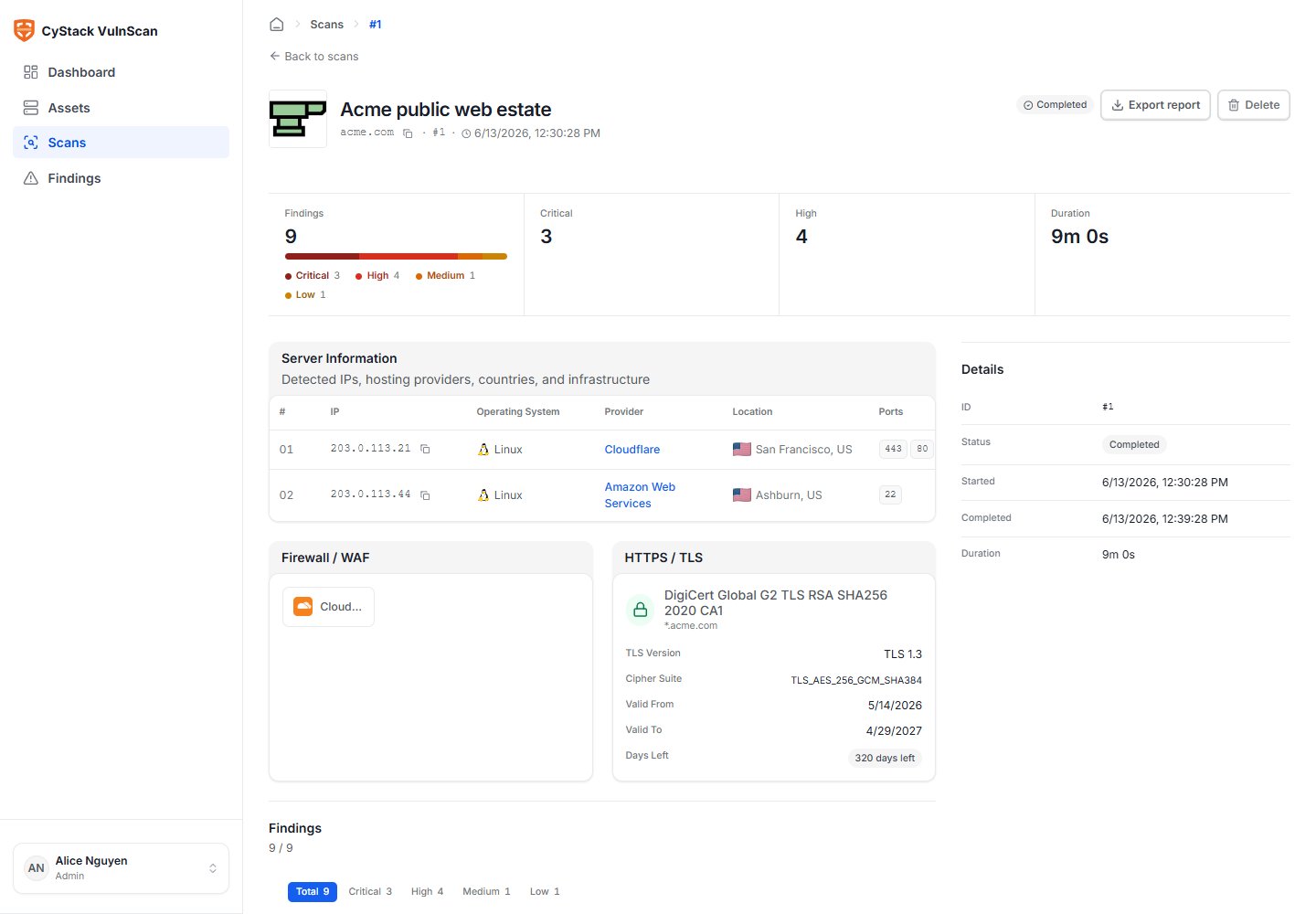 Use it to review:
* Scan source: Web UI, CLI, or scheduled job.
* Start time, finish time, duration, and current status.
* Target and asset linkage.
* Discovered hosts, services, technologies, and URLs.
* Finding counts by severity.
* Critical and High findings requiring immediate review.
* Report export actions.
## What Happens During a Scan
1. **License validation** checks target permission and target count.
2. **Discovery** identifies live hosts, subdomains, ports, web services, TLS, WAF/CDN, and metadata.
3. **Fingerprinting** identifies products, versions, frameworks, components, banners, and CPE candidates.
4. **Detection** runs native vulnerability checks, product-specific checks, unauthenticated service checks, and known-CVE matching.
5. **Enrichment** adds CVSS, EPSS, CISA KEV, CWE, OWASP Top 10, OWASP WSTG, remediation, and references.
6. **Deduplication** merges duplicate findings and preserves the strongest evidence.
7. **Risk scoring** calculates a 0-100 risk score based on severity, exploitability, confidence, and verification signals.
8. **Persistence** writes scan metadata, findings, assets, and reports into the workspace database.
## Web, CLI, and Scheduled Sources
Standard scans from the Web UI, CLI, and scheduler are written to the same database. The scan source is stored so teams can audit where a result came from:
* `web`: a user started the scan from the Web UI.
* `cli`: a user or automation started the scan from the CLI.
* `scheduled`: a recurring scan job created the scan.
This model prevents the Web UI from showing stale local files and keeps reporting consistent across manual and automated workflows.
## Accuracy Guidance
To improve accuracy:
* Provide authentication context for applications that hide functionality behind login.
* Scan canonical hostnames rather than only raw IP addresses for virtual-hosted web applications.
* Keep vulnerability intelligence data updated.
* Use focused scans for complex applications before expanding to all subdomains.
* Re-scan after remediation to verify fixes.
* Treat low-confidence or unusual findings as review candidates rather than immediate remediation tickets.
## Large Scans
For large domains or CIDR ranges:
* Start with discovery and inventory review.
* Split critical applications into separate assets.
* Use tags to group remediation owners.
* Schedule recurring scans outside peak traffic windows.
* Generate PDF reports as background jobs instead of keeping the browser open.
* Use CSV/JSON exports for bulk remediation and integration workflows.
Use it to review:
* Scan source: Web UI, CLI, or scheduled job.
* Start time, finish time, duration, and current status.
* Target and asset linkage.
* Discovered hosts, services, technologies, and URLs.
* Finding counts by severity.
* Critical and High findings requiring immediate review.
* Report export actions.
## What Happens During a Scan
1. **License validation** checks target permission and target count.
2. **Discovery** identifies live hosts, subdomains, ports, web services, TLS, WAF/CDN, and metadata.
3. **Fingerprinting** identifies products, versions, frameworks, components, banners, and CPE candidates.
4. **Detection** runs native vulnerability checks, product-specific checks, unauthenticated service checks, and known-CVE matching.
5. **Enrichment** adds CVSS, EPSS, CISA KEV, CWE, OWASP Top 10, OWASP WSTG, remediation, and references.
6. **Deduplication** merges duplicate findings and preserves the strongest evidence.
7. **Risk scoring** calculates a 0-100 risk score based on severity, exploitability, confidence, and verification signals.
8. **Persistence** writes scan metadata, findings, assets, and reports into the workspace database.
## Web, CLI, and Scheduled Sources
Standard scans from the Web UI, CLI, and scheduler are written to the same database. The scan source is stored so teams can audit where a result came from:
* `web`: a user started the scan from the Web UI.
* `cli`: a user or automation started the scan from the CLI.
* `scheduled`: a recurring scan job created the scan.
This model prevents the Web UI from showing stale local files and keeps reporting consistent across manual and automated workflows.
## Accuracy Guidance
To improve accuracy:
* Provide authentication context for applications that hide functionality behind login.
* Scan canonical hostnames rather than only raw IP addresses for virtual-hosted web applications.
* Keep vulnerability intelligence data updated.
* Use focused scans for complex applications before expanding to all subdomains.
* Re-scan after remediation to verify fixes.
* Treat low-confidence or unusual findings as review candidates rather than immediate remediation tickets.
## Large Scans
For large domains or CIDR ranges:
* Start with discovery and inventory review.
* Split critical applications into separate assets.
* Use tags to group remediation owners.
* Schedule recurring scans outside peak traffic windows.
* Generate PDF reports as background jobs instead of keeping the browser open.
* Use CSV/JSON exports for bulk remediation and integration workflows.