> ## Documentation Index
> Fetch the complete documentation index at: https://docs.cystack.net/llms.txt
> Use this file to discover all available pages before exploring further.
# Uninstall Agent
> Step-by-step guide to safely and completely uninstall the Agent from your devices
## Guide to Uninstalling CyStack Agent
When a device no longer requires management (e.g., hardware failure, device replacement, employee offboarding, or subscription expiration), Administrators can uninstall the Agent directly via the Management Dashboard.
**Avoid uninstalling the Agent directly on the device** using the Control Panel or standard uninstallation tools. This method may fail to completely remove the security components bundled with the Agent.
This is a **Self-Protection Mechanism** designed to prevent end-users from unauthorized removal of corporate management software. All uninstallation tasks must be initiated from the Dashboard to ensure a complete removal.
To uninstall the Agent, please follow these steps:
Navigate to the Devices section on the navigation bar.} />
Click the options icon {'\u22EE'} corresponding to that device.} />
Select Uninstall.}>
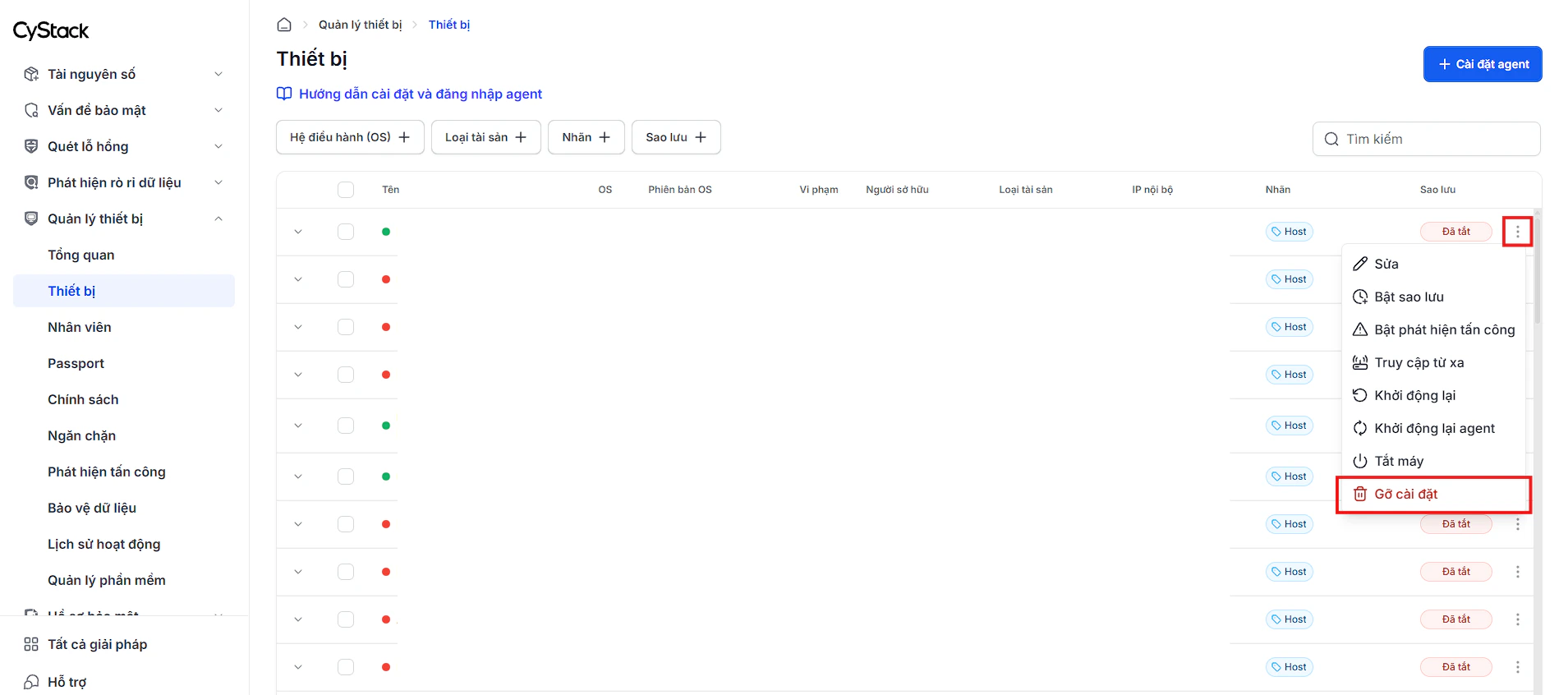 If the device is currently offline, the uninstallation command will be executed as soon as the device reconnects to the Internet.
**Important notes after a device is removed from the Workspace:**
* The device will stop receiving management policies from the system.
* All share links and preview links created from that device will be deleted and will no longer be accessible.
If the device is currently offline, the uninstallation command will be executed as soon as the device reconnects to the Internet.
**Important notes after a device is removed from the Workspace:**
* The device will stop receiving management policies from the system.
* All share links and preview links created from that device will be deleted and will no longer be accessible.