> ## Documentation Index
> Fetch the complete documentation index at: https://docs.cystack.net/llms.txt
> Use this file to discover all available pages before exploring further.
# Passport
> Guide to Internal Network Access with Passport
**Use Cases**
* Developers need access to Git servers to perform `git pull/clone/push` operations, while access must be restricted for non-development personnel.
* SRE Team members need SSH/RDP access to specific servers without exposing these resources to other employees.
* You need to host internal web applications that must remain inaccessible to the public internet.
* You want to eliminate the complexity of configuring traditional VPNs, enabling rapid internal network access while reducing latency bottlenecks associated with centralized gateways.
## Overview
**Passport** is a core module of CyStack Endpoint, designed to secure internal networks and endpoints using a Zero Trust Network Access (ZTNA) model. Passport leverages the architecture of [**Tailscale**](https://github.com/tailscale/tailscale) — a virtual private network (VPN) built on **WireGuard** — to ensure secure connectivity, end-to-end encryption, and granular access control between devices within a system.
Passport enables organizations to:
* Securely interconnect endpoints over a private mesh network.
* Enforce robust authentication based on device and user identity.
* Apply flexible, context-aware access control policies.
* Monitor and log all network activity.
***
## Solution Architecture
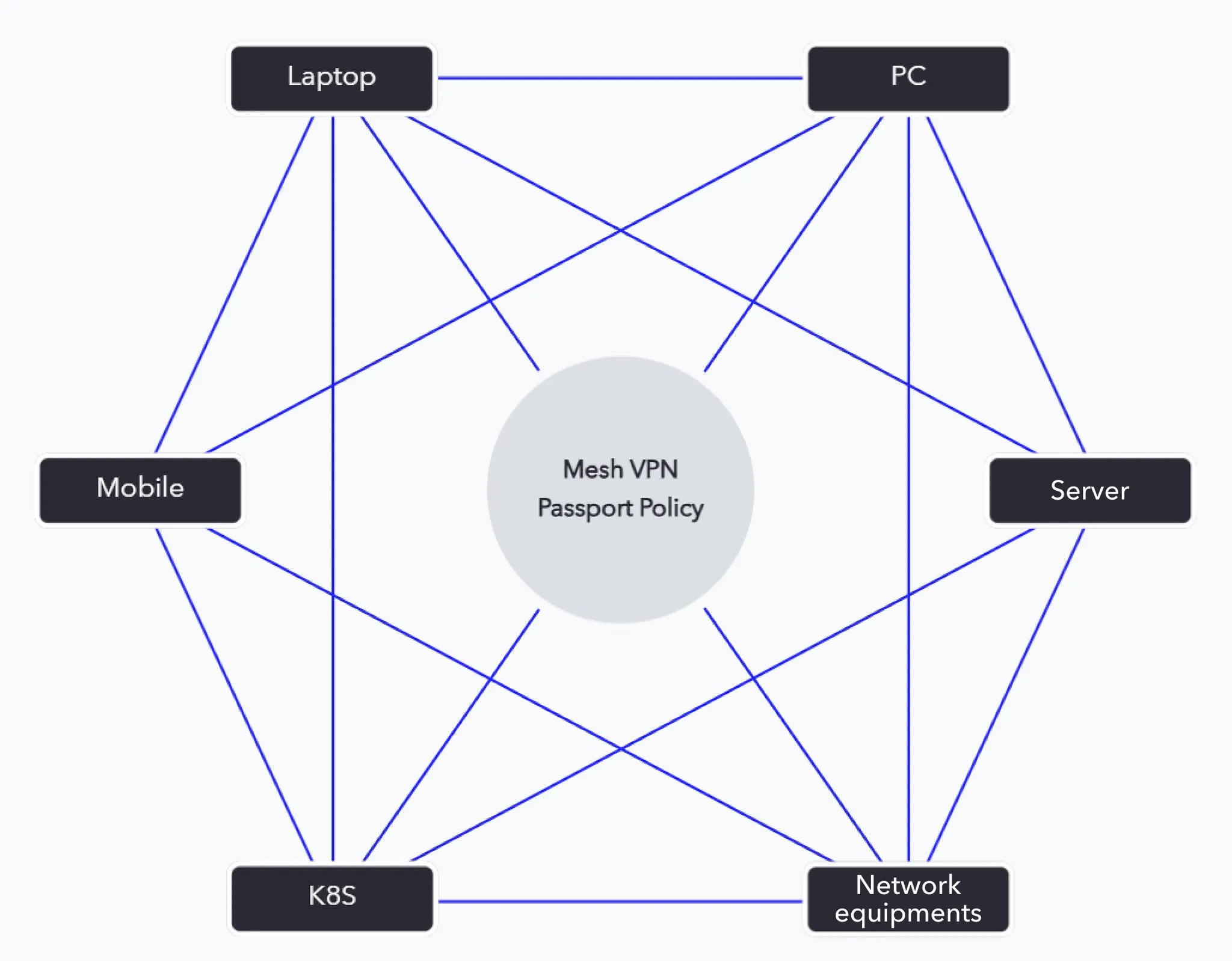 ### 1. Endpoint Devices
* Laptops, mobile devices, servers, or any asset requiring protection and management.
* The CyStack Endpoint agent is installed, automatically joining the private Passport network.
* User authentication is handled by Identity Providers (Google Workspace, Microsoft Entra ID, Okta, etc.).
### 2. Tailscale Control Plane
* The central SaaS management layer for Passport.
* It does not transport user traffic, only coordinates peer-to-peer connection establishment.
* Responsibilities include:
* Device authentication.
* User authentication.
* Distribution of ACL (Access Control List) policies.
### 3. Data Plane (Peer-to-Peer Encrypted Mesh VPN)
* Utilizes WireGuard for end-to-end encryption.
* Data flows directly between devices without passing through a centralized server.
* Leverages NAT traversal and relay servers (DERP) from Tailscale when necessary.
### 4. Passport Policy Engine
A specialized policy layer layered atop Tailscale:
* Groups devices by role (e.g., Employees, Administrators, Servers, CI/CD Runners).
* Defines granular access permissions (Block or Allow specific services, ports, or devices).
* Integrates with SIEM/SOC solutions for logging and alerting.
### 5. Identity Provider (IdP)
* Integrates with the enterprise's existing authentication infrastructure.
* Supports Single Sign-On (SSO) and Multi-Factor Authentication (MFA).
### 6. Monitoring & Logging
* Passport logs all activity within the network.
* Feeds data into security monitoring systems (SIEM) for behavioral analysis and early intrusion detection.
***
## Identity and Device Control
A fundamental capability of **Passport** is the **tight binding between users and their managed devices**, creating a foundation for context-aware security policies.
* Upon device registration, Passport assigns ownership identity based on the authentication process.
* The system maintains a dynamic **user-to-machine** map, ensuring visibility into asset ownership across the organization.
* Security policies are enforced based on this relationship:
* Access rights can be granted or restricted based on the owner, not just the device.
* *Example: Only devices belonging to the* Finance *group are permitted to access the internal accounting system.*
* Policies update automatically if device ownership changes or user access is revoked, minimizing risk and maintaining compliance.
* Activity logs capture both **device** and **user** context, facilitating more effective incident investigation and security analysis.
***
## Access and Security Policies
Enterprise policies are categorized into two types:
* **Machine-to-machine policies:** Define connectivity rules from a source device to a destination device.
* **User-to-machine policies:** Define connectivity rules for devices owned by a specific employee to a destination device.
### Adding a Policy
Navigate to "Endpoint" {'\u2192'} "Passports" {'\u2192'} click
### 1. Endpoint Devices
* Laptops, mobile devices, servers, or any asset requiring protection and management.
* The CyStack Endpoint agent is installed, automatically joining the private Passport network.
* User authentication is handled by Identity Providers (Google Workspace, Microsoft Entra ID, Okta, etc.).
### 2. Tailscale Control Plane
* The central SaaS management layer for Passport.
* It does not transport user traffic, only coordinates peer-to-peer connection establishment.
* Responsibilities include:
* Device authentication.
* User authentication.
* Distribution of ACL (Access Control List) policies.
### 3. Data Plane (Peer-to-Peer Encrypted Mesh VPN)
* Utilizes WireGuard for end-to-end encryption.
* Data flows directly between devices without passing through a centralized server.
* Leverages NAT traversal and relay servers (DERP) from Tailscale when necessary.
### 4. Passport Policy Engine
A specialized policy layer layered atop Tailscale:
* Groups devices by role (e.g., Employees, Administrators, Servers, CI/CD Runners).
* Defines granular access permissions (Block or Allow specific services, ports, or devices).
* Integrates with SIEM/SOC solutions for logging and alerting.
### 5. Identity Provider (IdP)
* Integrates with the enterprise's existing authentication infrastructure.
* Supports Single Sign-On (SSO) and Multi-Factor Authentication (MFA).
### 6. Monitoring & Logging
* Passport logs all activity within the network.
* Feeds data into security monitoring systems (SIEM) for behavioral analysis and early intrusion detection.
***
## Identity and Device Control
A fundamental capability of **Passport** is the **tight binding between users and their managed devices**, creating a foundation for context-aware security policies.
* Upon device registration, Passport assigns ownership identity based on the authentication process.
* The system maintains a dynamic **user-to-machine** map, ensuring visibility into asset ownership across the organization.
* Security policies are enforced based on this relationship:
* Access rights can be granted or restricted based on the owner, not just the device.
* *Example: Only devices belonging to the* Finance *group are permitted to access the internal accounting system.*
* Policies update automatically if device ownership changes or user access is revoked, minimizing risk and maintaining compliance.
* Activity logs capture both **device** and **user** context, facilitating more effective incident investigation and security analysis.
***
## Access and Security Policies
Enterprise policies are categorized into two types:
* **Machine-to-machine policies:** Define connectivity rules from a source device to a destination device.
* **User-to-machine policies:** Define connectivity rules for devices owned by a specific employee to a destination device.
### Adding a Policy
Navigate to "Endpoint" {'\u2192'} "Passports" {'\u2192'} click Add new connection policy.} />
Select the connection type: Host - Host or User - Host.} />
Select the action: Reject or Accept.} />
Select the user / source device and the destination device.} />
**Examples:** DNS (53), FTP (21), HTTPS (443), SSH (22), Telnet (23), etc.
To enforce the policy only during specific hours, select Allow connection within time frame {'\u2192'} define the frequency and specific time window.
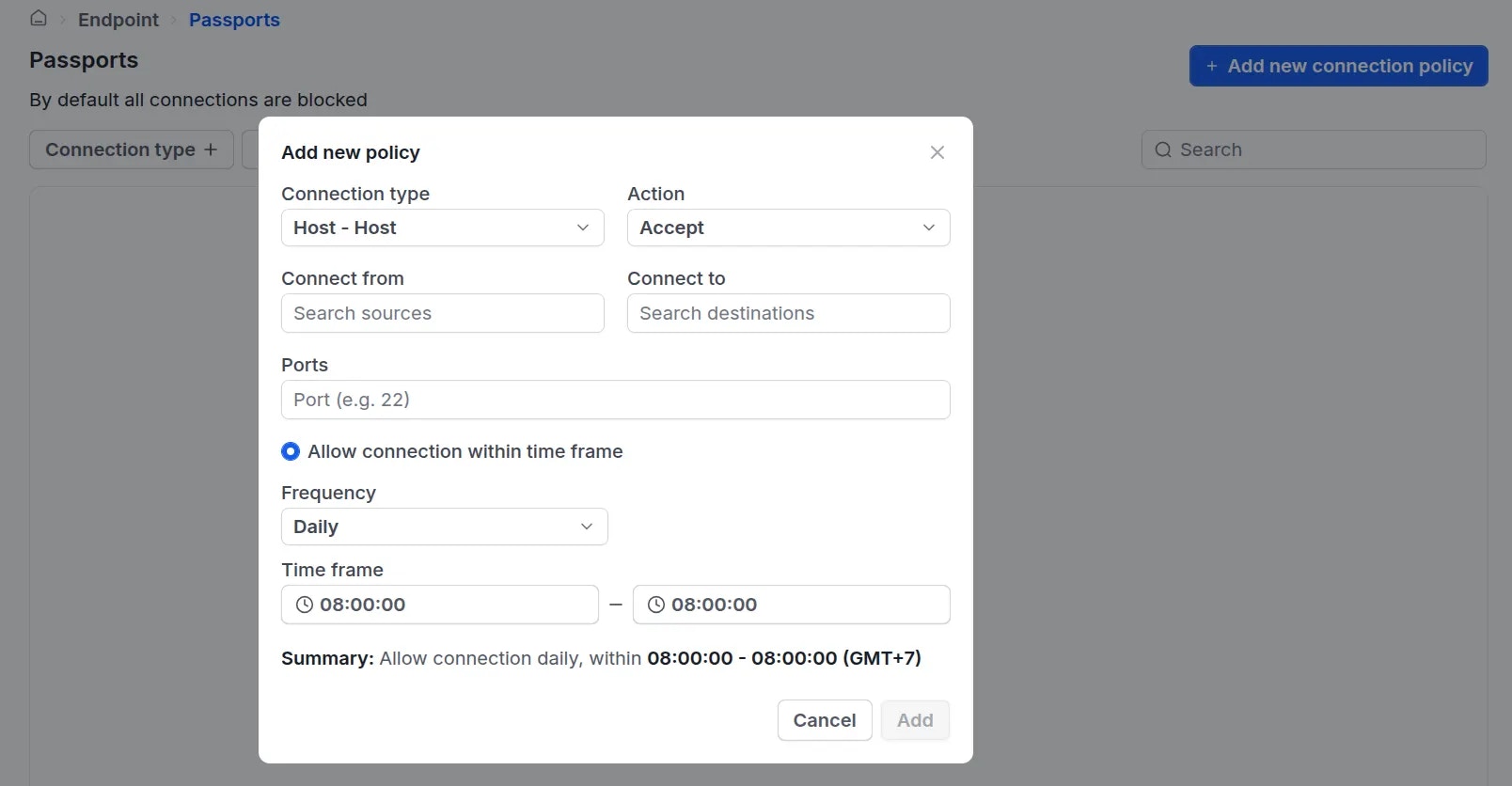 Click
Click Add to deploy the policy to the selected users or devices.} />
**Note:** By default, all connections are blocked. Therefore, administrators must explicitly create an `Allow` policy using the steps above to enable connectivity between users and devices, or between devices.