> ## Documentation Index
> Fetch the complete documentation index at: https://docs.cystack.net/llms.txt
> Use this file to discover all available pages before exploring further.

# Remote Restart/Shutdown

> Guide to remotely restarting or shutting down managed devices

<Card>
  **Use Cases:**

  * **Off-hours Maintenance:** Remotely and automatically reboot endpoints after Windows updates or security patch installations at any time.
  * **Incident Response:** Immediately shut down or isolate compromised devices upon detection of malware or ransomware to contain threats and prevent lateral movement within the network.
</Card>

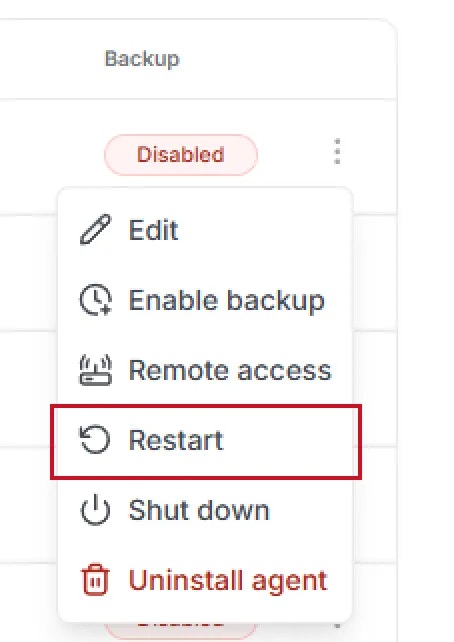
## Remote Restart

<Steps>
  <Step title={<>On the "Device" page, click the <code>{'\u22EE'}</code> button next to the target device {'\u2192'} select <code>Restart</code>.</>}>
    <img src="https://mintcdn.com/cystack/NwFcT4Q52zfPNCn3/images/endpoint/en-device-control-device-menu-restart.png?fit=max&auto=format&n=NwFcT4Q52zfPNCn3&q=85&s=1ad2682a9cc09c5bb729196d843e7c45" alt="device-control-device-menu-restart" style={{display: 'block', margin: '0 auto'}} width="454" height="642" data-path="images/endpoint/en-device-control-device-menu-restart.png" />
  </Step>

  <Step title="The device will initiate the restart process as requested." />
</Steps>

***

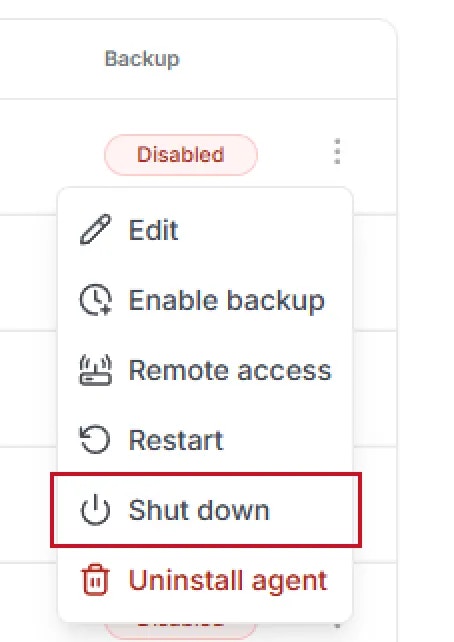
## Remote Shutdown

<Steps>
  <Step title={<>On the "Device" page, click the <code>{'\u22EE'}</code> button next to the target device {'\u2192'} select <code>Shutdown</code>.</>}>
    <img src="https://mintcdn.com/cystack/NwFcT4Q52zfPNCn3/images/endpoint/en-device-control-device-menu-shutdown.png?fit=max&auto=format&n=NwFcT4Q52zfPNCn3&q=85&s=e60c6696ee111405f60ab53051532a72" alt="device-control-device-menu-shutdown" style={{display: 'block', margin: '0 auto'}} width="454" height="642" data-path="images/endpoint/en-device-control-device-menu-shutdown.png" />
  </Step>

  <Step title="The device will shut down as requested." />
</Steps>